Questions? Call 094 923 6639 Set up and live within a day

Court booking · ProShop · café — one system

Court booking
that counts shuttlecocks
and coffee cups too

Zentr Sport is a court booking and venue management system for badminton, tennis and pickleball that brings court booking, the ProShop and the café into one system. Customers book courts themselves via LINE around the clock, with no one watching the chat.

3 sports, one map
Book via LINE 24/7
Set up in a day
No credit card needed
Smile Badminton Court Wed 12 Aug · 6 courts Live
Open Booked Regular group Sample in play

The problem

Double-booked courts because bookings come in from several places at once

Most venues note bookings in a counter notebook, take more over chat, and get still more by phone. Those three channels don't know about each other. The gap between someone taking a booking and someone writing it in the book is exactly where double-bookings happen.

3 places
one venue's bookings are scattered across — the counter notebook, chat, and the phone
24 hrs
that customers can ask about open courts, with no one watching the chat
0 double-bookings
the system locks courts in real time across every channel, so overlaps can't happen in the first place
1 systems
the court map and the point of sale live in one place — no switching between two programs

Everything in it

The three things a venue runs in one system

A venue is three businesses stacked together — selling court time, selling gear, and selling food and drink. Here they're one system: one court map and one point of sale.

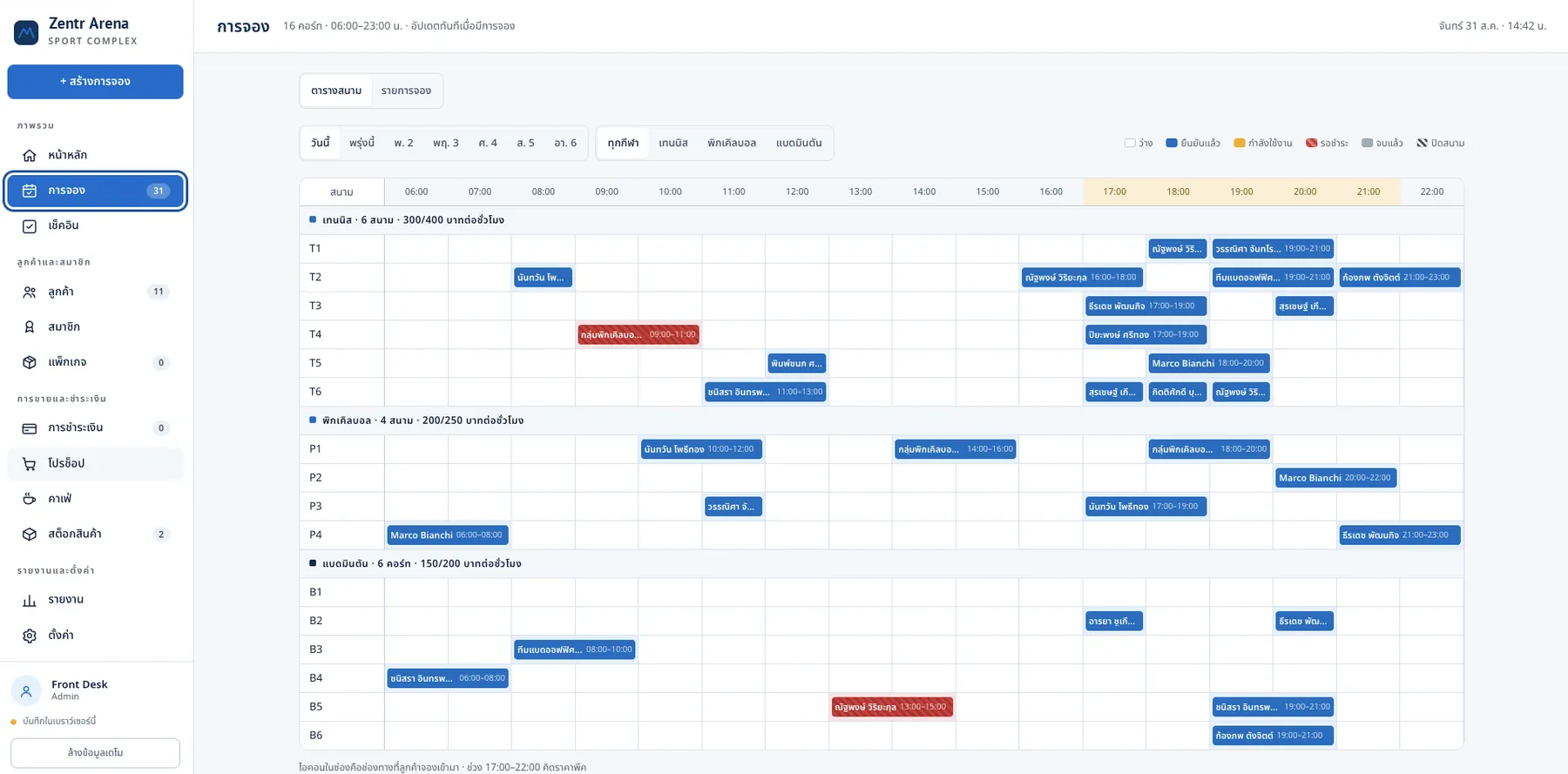
Court systemZentr Sport court booking — a court map showing tennis, pickleball and badminton in one grid

Court booking

One court map every channel sees the same — the counter, the booking website, and LINE OA. Overlaps can't happen at the source.

  • Book by the hour or half-hour, with a minimum you set.
  • Separate peak / off-peak rates, and separate weekday and weekend prices.
  • Weekly regular groups, courts reserved ahead for the whole term.
  • Deposits via PromptPay, with cancellation and refund rules.
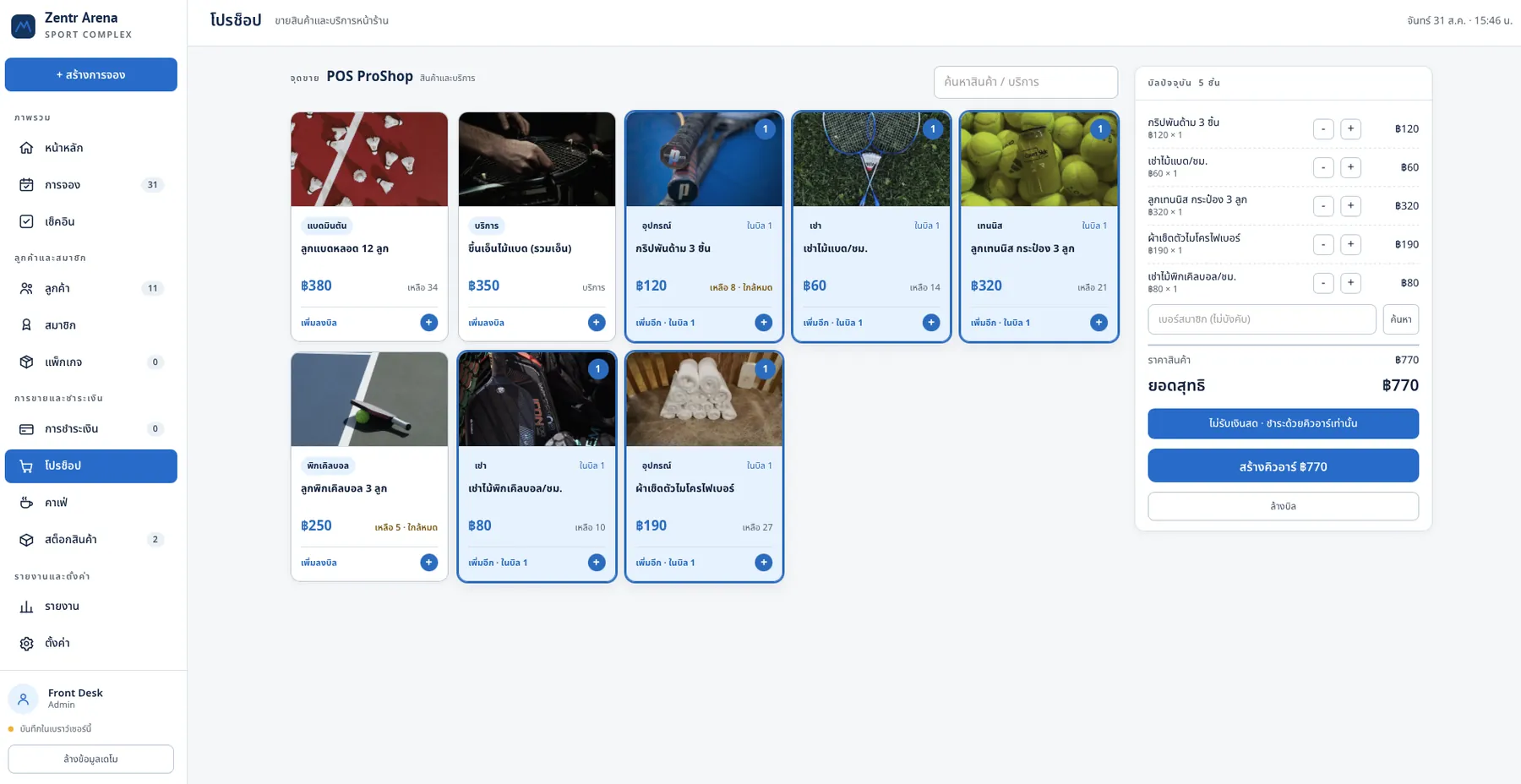
ProShopZentr Sport ProShop sales screen showing shuttlecocks, rackets and strings with the bill on the right

ProShop

Retail sales with stock tracking, and a restringing queue you no longer note on sticky paper.

  • Stock for shuttlecocks, rackets, strings, grips and shoes.
  • Deduct shuttlecocks one at a time from an opened tube, not the whole tube.
  • Alerts when stock runs low, at the reorder point you set.
  • Sell café items from the same screen.
Read about POS for the ProShop ↗
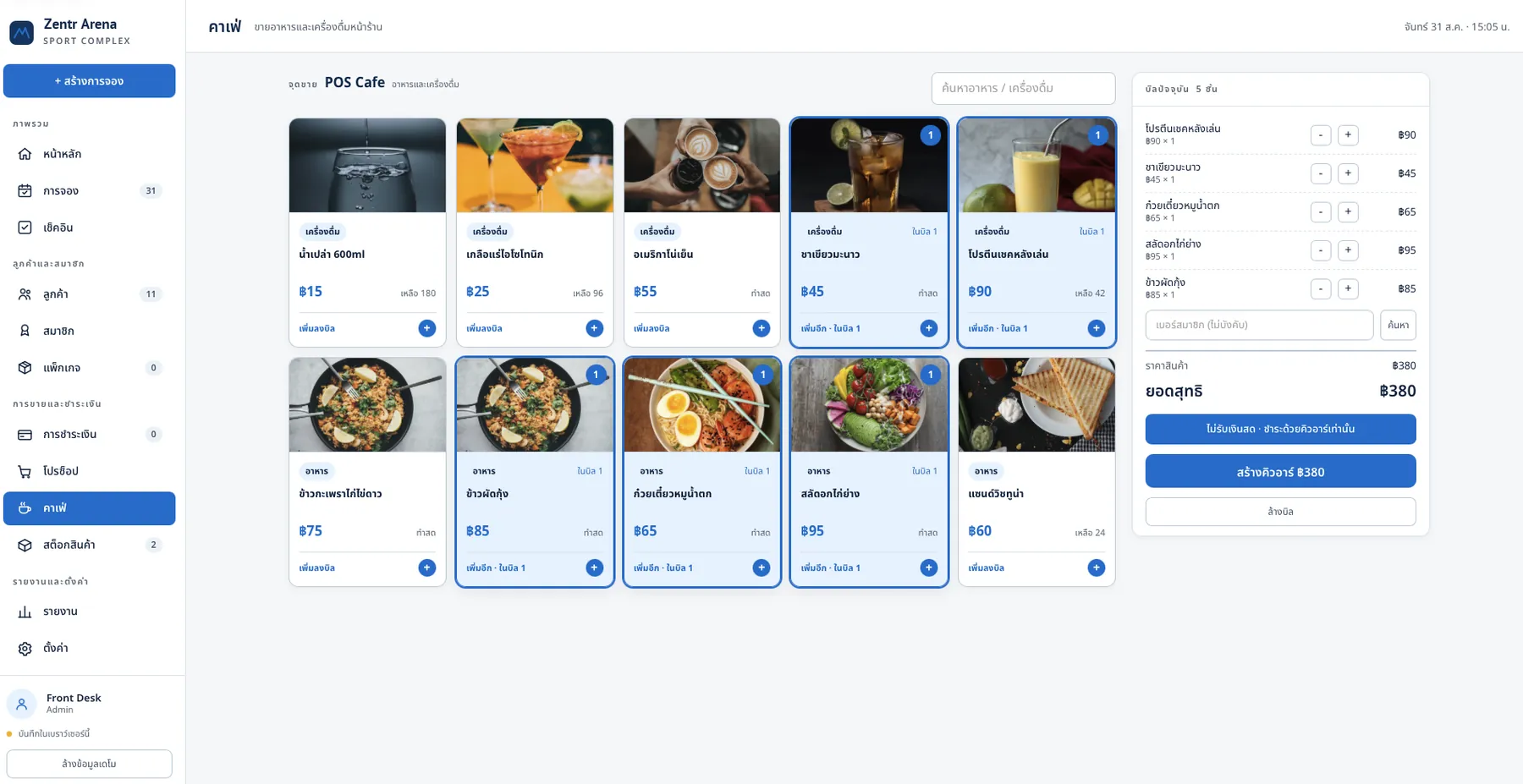
CaféZentr Sport café sales screen using the same POS as the ProShop

Café

Food and drink sell through the same POS as the ProShop — no extra program.

  • The drinks and food menu lives in the same product list.
  • Stock is deducted and low-stock alerts fire just like any other product.
  • Take cash or PromptPay QR, chosen per bill.
  • Sales roll up in the same place as the ProShop's.
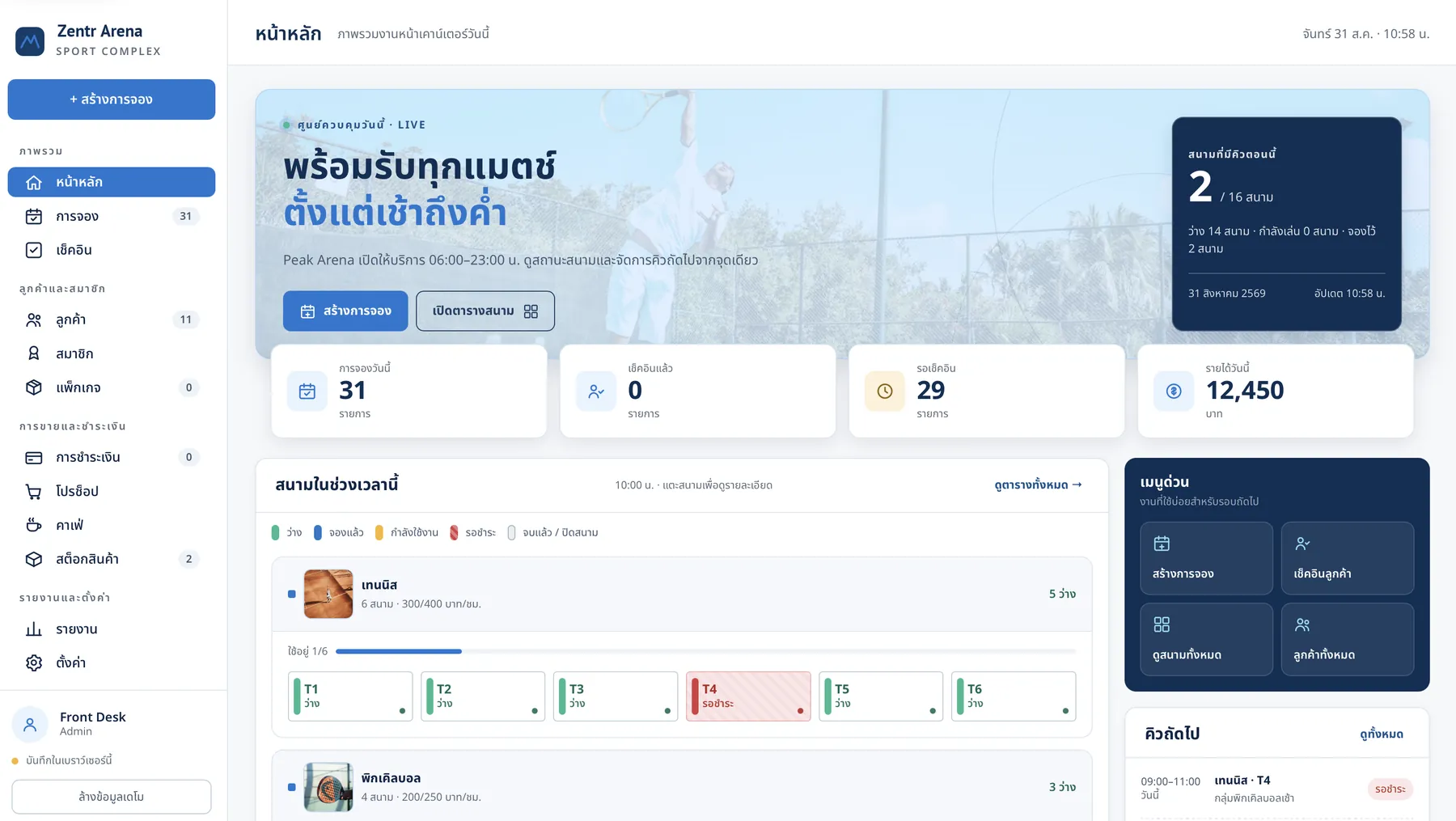
Zentr Sport court-management dashboard showing 31 bookings today, 29 awaiting check-in, and THB 12,450 in revenue today
1 screenSee the whole day at the venue, from open to close.

Why a system

The venue already has staff — why add a system?

The problems aren't because people work badly. They come fromlimits no one, however good, can get past — a system doesn't replace people, it just exists in many places at once.

  • One person can only be in one place

    At the busy early-evening peak, one staffer can't take money, answer the phone and reply to chat all at once. A system can be everywhere at once.

  • Time gaps are where courts collide

    Between taking a booking and writing it down, that court still looks open to someone else. The system locks the court the second it's booked.

  • Customers ask when no one's in

    People ask after work and before bed — hours the venue is already closed. Unanswered, they ask another venue the same night.

  • The venue's knowledge doesn't leave with the staff

    Which group books which day, who's paid and who hasn't — today that lives in someone's memory. The day they quit, the system still remembers.

How it works

A Wednesday night at your venue

From the first message to paying up and heading home — all on one timeline.

Tonight21:40
01

A customer

messages on LINE as the venue is about to close

“Any courts left at 7pm tomorrow? We'll take 2” — Zentr understands the shorthand, typos and real wording players use.

Tonight21:40
02

Zentr

Checks the real court map and offers only what's open

It reads all 6 courts, subtracts existing bookings, reserved regular groups and courts closed for repair, then replies with the correct early-evening price.

Tonight21:42
03

Zentr

Takes the deposit and locks the court instantly

The customer picks courts 3 and 4 and pays the deposit via PromptPay in chat. The system locks the courts that second; anyone who messages later won't see those slots.

Tomorrow19:35
04

During play

Buy more shuttlecocks, order drinks from the café

Sold from the same screen. Shuttlecocks are deducted one at a time from an open tube, not the whole tube.

Next morning09:00
05

The next morning

Open it to see who booked yesterday

Past bookings are in the system — no notebook to open, no chat to scroll.

Features

What makes a sports venue different from an appointment business

A sports venue sells space by the hour to groups who come back every week and buy food while they play. Below is what the system does today — including what it doesn't yet.

AI chat

Almost every after-hours question is “any courts left tomorrow?” — which the system answers itself from the real court map.

Channels
LINE Official Account and the venue's web booking page.
What it answers
Open courts, prices by time slot, parking, directions and venue rules.
Hand-off
When it's out of scope, it hands off to staff with a conversation summary.

Groups and members

Regular groups are a venue's most predictable income. The system reserves courts ahead on the schedule you set.

Recurring booking
Weekly or monthly, courts reserved ahead for the whole term.
Skip a week
Close only the weeks a group doesn't play, without affecting the rest.
Release back
Unused weeks release the court back into the system for others to book.

The counter

A screen a late-shift staffer learns in ten minutes. See the whole day's court map on one page; open a bill, move a court or extend time without changing screens.

walk-in
Walk-ins: tap an open court and open a bill in two clicks.
Extend time
Add an hour mid-session; the system checks the next slot is really free.
Sell items
Sell shuttlecocks or food from the same screen, no switching programs.

Look back

Search who booked what and when. This part is still basic — you can see past bookings and sales, but there are no charts or analytical reports yet.

Bookings
Searchable history by date, court or booker name.
Sales
See past ProShop and café sales.
Not yet
Hourly court-utilisation charts, and reports that suggest what to do next.

What changes

The old working day versus a working day with Zentr Sport

Before opening
BeforeOpen the booking notebook, read yesterday's handwriting, and guess whether a crossed-out slot means cancelled or moved.
With Zentr SportOpen the screen to the whole day's map and know at once which courts are full, which are free, and whose deposit hasn't landed.
Early evening · the busiest hour
BeforeA queue at the counter pays for courts, buys shuttlecocks and orders drinks, while one staffer juggles all three.
With Zentr SportThe court-payment queue is gone — people booked and paid deposits already. Only buyers remain, sold to from the same screen.
A call comes in when courts are full
BeforePut the phone down, open the notebook, come back to say it's full. That's it — the customer goes elsewhere.
With Zentr SportNo need to put the phone down — open the map, see what's left, and offer a nearby time on the spot.
After closing
BeforeReconcile the booking notebook against the cash, then add up sales from another book.
With Zentr SportThe day's bookings and sales are already in the system — just open them, no tallying by hand.

Who it's for

this court booking system Who it's for

If your revenue is hours times courts, every empty court-hour is already expired — you can't sell it back. Zentr Sport is built for exactly this business.

Badminton courts rented by the hour
Tennis courts, outdoor and indoor
Pickleball courts
Multi-sport indoor venues
Futsal and artificial-turf pitches
Squash courts and sports clubs
Academies and sports schools
Courts in condos and housing estates

Try it

At 10pm tonight, who answers your customers?

A full free month with nothing locked away — long enough to cover both the quiet weekday courts and the packed Friday night.

  • Set up the court map, time-slot pricing and deposit rules to match how your venue actually runs.
  • Connect your venue's LINE Official Account to the same booking system.
  • Court booking, AI chat and the point of sale are all switched on — nothing locked.
  • Our team helps move your booking schedule, customer list and product list from your old system the first time.
1 month

Free trial, no credit card required

Start your free 1-month trial ↗ Book a 20-minute demo

Set up and live within a day · cancel any time, no penalty

Questions

Questions venue owners ask most

How many courts and which sports does it support?
It supports badminton, tennis, pickleball, futsal and squash, with an unlimited number of courts. Each court has its own sport, price and opening hours. A multi-sport venue sees everything on one map, but the system doesn't yet know which courts share physical space — if two courts are split from the same area, you'll need to block the other side's time yourself.
How do weekly regular groups work?
Set them as recurring bookings and the system reserves courts ahead on a fixed schedule — say every Wednesday 19:00–21:00 for three months. You can close only the weeks a group skips without affecting the series, and release unused weeks back for others to book. Collecting money from individual group members, though, isn't built in yet — you still handle that yourselves.
Can the AI really reply in chat and close the booking itself?
Yes. Connect your venue's LINE Official Account and the AI reads the real court map, replies with what's open, and closes the booking right there in chat — no one watching needed. Every booking the AI makes shows up on the map, editable or cancellable any time.
If I sell shuttlecocks one at a time from an opened tube, does the count stay right?
Yes. Set how many shuttlecocks are in a tube and the system deducts in both units. The stock view shows how many unopened tubes remain and how many shuttlecocks are left in the open one. Café items sell through this same screen and get the same low-stock alerts.
What can the system not do yet?
Not yet: analytical reports such as hourly court-utilisation charts (you only get past bookings and sales), collecting money from individual group members, automatic member pricing, a restringing job queue, coach and class schedules sold by the seat, ordering food from the court by QR, shift close-out, offline selling when the internet drops, and court-light on/off control. We list this here so you decide on what's really there.
How long does setup take?
Most venues go live within a day. The court map and time-slot pricing take about 20 minutes, connecting LINE OA another 10. ProShop and café products import from an existing Excel file. Our team runs an online session to set it up with you the first time, at no cost.
Can I move data from my old system or Google Sheets?
Yes. Import your booking schedule, customer list and products from Excel, Google Sheets or your current booking system. During the trial our team helps with the first move at no cost, and if you ever leave, you can export all your data back out to a file just the same.
How safe is customer data?
Data is stored on servers in Thailand, encrypted both in transit and at rest, and meets PDPA requirements including deletion on the data owner's request.